Wardrobe & costume tracking templates and tools
I love Wardrobe and I want to share it with others. I hope these will be useful tools for students, Stage Managers, people who are new to the field or moving up from storefront, and anyone who enjoys a clean template! I built most of these templates and tools from scratch, and gatekeeping them so that other people have to reinvent the wheel seems unfruitful.
Check out the Table of Contents below for more information on the tools I’ve shared, an introduction to Wardrobe and Costumes terminology and responsibilities, and some general information about this area of stagecraft. Be sure to also check out the further resources collection and a stitch sampler.
You are welcome to duplicate these documents to fill in for your own use. Every show is unique, and I encourage you to adapt your paperwork to match your production, your crew, and the way your brain works. Please do not distribute the templates as your own, and include the “read me” credits tab when sharing the templates. I am available by email and am happy to answer questions and talk Wardrobe with anyone. Please also consider me for any of your Chicago or Phoenix-area Wardrobe needs!
TABLE OF CONTENTS
-
Wardrobe is a specialized theatrical department that performs costume quickchanges, tracks costumes, and handles all the practical business of maintaining costumes throughout the run of a show. Costume repairs, ironing and steaming, laundry, and drycleaning are all managed by Wardrobe, as are the dressing rooms. On a production with an extended multi-month run, Wardrobe may also handle costuming performers that are added to the production after opening. They work closely with the Stage Management team to ensure that costumes are prepared for the performers and ready where they are needed. Wardrobe is the true Fairy Godmother that transforms Cinderella from peasant to royalty, and Elsa into a Snow Queen!
A major principle of Wardrobe’s role is to maintain the integrity of the costume design, and to ensure that the show looks identical for opening night, closing, and every performance in between.
Every theater functions slightly differently. On some productions, particularly in community theatre, Wardrobe and Costumes are not separate departments. The same people who build and source the costumes maintain them through the run. Similarly, costume quickchanges and mid-performance responsibilities may be managed by Stage Management and enacted by Run Crew on some productions, with no dedicated Wardrobe crew.
In most larger-scale professional theatre, however, a dedicated Wardrobe team that specializes in dressing, sewing and garment repair, and garment maintenance manages costumes past opening night. This is especially true on AEA (Actors’ Equity Association) productions, as those contracts have specific rules governing laundry, dressing rooms, and what can be asked of actors and stage managers.
Some wardrobe workers are unionized, and generally share a contract with a unionized costume shop. In North America, they are generally members of the International Alliance of Theatrical Stage Employees (IATSE).
Wardrobe on television and film functions differently. This description and these resources apply specifically to theatrical/live performance work.
I believe Wardrobe is critically positioned in the theater environment to engage in efforts for equity, inclusion, and access. Wardrobe supports performers in physically and psychologically vulnerable moments and frequently serves as confidant, caretaker, and advocate. Visit www.audengranger.com/wardrobejustice to learn more about my activist project Wardrobe Justice.
-
Extensive glossary of all terms used in the spreadsheet and other Wardrobe/Costumes/theatrical terms
Color-coding guide, which is universal for all the documents
Abbreviations list
Formatting, printability guidelines, and instructions for how to use/copy
Another glossary resource is The Dreamstress’ Historical Fashion and Textile Encyclopedia
-
I use my Costume Plot as the Bible document that tracks all costume changes, actor costume tracks, presets, and the piece list.
For Wardrobe, the plot is used to place costume changes appropriately through space and time and manage costume tracking during the run.
If you are creating a Costume Plot as a Designer or when handling Costumes solo, it is used primarily to track what costumes are worn at each time. If you are using this template just to track what each actor is wearing in each scene, you may skip the color coding component, the “CH” fill-ins, and the Presets/Deaths columns.
I build my Wardrobe version by synthesizing the information from Stage Management’s Enter/Exit Plot and the Costume Designer’s Costume Plot (or conversation with the Designer), and recording needs during tech.
The locations of Entrances/Exits are often not fully set or not completely documented by Stage Management before tech. The Costume Designer also frequently makes changes to costuming during tech. I include whatever information they have for me on this before tech to anticipate where changes might take place and what pieces might be involved and to get the lay of the land for costumes in advance, but expect it all to change during tech.
This is the main document I work out of during tech, and I then use it to create preset lists, actor one-sheets, wardrobe run sheets, and a piece list (if not provided by the Designer). I usually do not use it after those documents are made except to look at the show as a whole.
I have included the Costume Plot Key, a blank Costume Plot, and an example.
-
I use a scene breakdown as a preliminary document and build it from the script. It only tracks which characters are in each scene. Stage Management (usually the ASM) is also responsible for building a Character Scene Breakdown (CSB) and an Enter/Exit Plot, so I only make one when theirs is not usable or not ready. The Costume Designer also should make a Plot that has this information but is costume focused.
I have included a Scene Breakdown example and a blank Doublecast Scene Breakdown for children’s theatre.
-
The Preset List is a checklist to work through of where each costume piece needs to be placed for run of show.
If the Preset List includes ALL pieces, including those that live in the dressing rooms and do not move, it can also serve as a check-in/check-out of costume pieces to make sure that you have everything at the end of the night and at the top of the day (if needed). You may choose just to list those items on the sheet but not check them each day.
The Preset List is one of the two main Running Crew guides. Every Wardrobe Crew member should have a printed copy of the Preset List. I break it down by assignment so that each crewmember handles the same set of Presets every show; ideally a location they are stationed at (EX. Miguel’s track is mostly Stage Right, so they do SR presets). Because of this it should be formatted with page breaks between crew assignments/locations.
Depending on how extensive or complicated the Presets are, it may be helpful to use the checkmarks on the left. You can put one per performance and use it to check off each piece for a full week of shows. Crew could do this as they set their presets or it could just be used by the Supervisor to do a Presets Check.
My Preset List also includes a template for a Strike List (Froms) for Act 2/Postshow. This is a way to sort information by where it is coming from (where it is being struck from) as well as where it is going to. Some crewmembers I’ve worked with have liked this as an additional tool, and it can be helpful if you have a lot of things coming from one location and going many other places (such as from Dressing Rooms) or it is assigned in a certain way.
I also include Station Supplies and things that don’t need to be set everyday on the Preset List if they may need to be doublechecked at some point during the run. It can be useful to set this as a regular task at the start of the week, especially if other people have been in the space in the interim; for instance, laundry baskets, number of hangers, makeup wipes, etc.
I have included a template and an example. The example shows some of the ways it can be adapted to be show-specific, for instance, adding “From” information to specific pieces that might regularly tend to get lost, bolding something that often gets forgotten, or adding details of how exactly it should be set.
-
Run sheets are the second key document (along with the Preset List) used by Wardrobe Crew to run the show.
Sometimes Stage Management creates run sheets for Wardrobe Crew, and some Wardrobe Supervisors prefer to just augment these with more detail. I prefer to handle it myself, because I love the paperwork, obviously. I create these primarily from the Costume Plot and use the Build Out row at the bottom to begin assigning costume changes and tracking as we go through tech.
This should be printable and provided to Crew before First Preview.
I include Preshow and Postshow tasks as well where those are specifically assigned, such as one person always assisting a performer with their wig, one person always assigned to handwash, etc. Sometimes I will set a crewperson with an actor through preshow if they need dedicated assistance, including assistance staying on track.
For actual run of show assignments, I include as much detail as is needed, including timing and cues, order of operations, things to pay attention to, traffic patterns, etc. It should be clear and thorough enough for a cover to pick up right away.
The Run Sheet Examples show how this structure can be adapted for each show. As with all this documentation, not everything will be needed for each production.
Run Sheet Example 2 also shows an adaptation; on this production, we had Student Matinees that had no intermission and an adjusted run of show. I use the magenta color-code for this.
During Previews, I ask crew to take written notes on their printed run sheet of anything that didn’t work, details that need to be added, etc, and incorporate those in the next version.
There are many ways to build Wardrobe Run Tracks. I try to stay conscious of a couple of variables, and maintain continuity as much as possible.
Continuity through space. I try to prevent Crew running back and forth across the space. I also try to assign Presets in a way that makes sense with their Run Track; especially locations where they spend a lot of time or presets for quickchanges that they manage (continuity of task).
Continuity with cast. I find it is beneficial to keep the same crew with the same castmembers as much as possible, especially for very intimate changes/down to skins. This helps build rapport with actors and helps understudies. It has a secondary benefit of reducing the need for full crew to attend Understudy Put-Ins. If all an actor’s quickchanges are done with one crewmember, only that crewmember needs to be at that Put-In. Putting difficult performers with Supervisors or pairing someone with a crew member they already have a good relationship with can also help manage the backstage environment and interpersonal issues. This should never be used as a way to skate around truly abusive or sexually inappropriate behavior, though.
Skills and Tasks. For example, putting a crewmember who has special skills with wigs or makeup on wig/makeup changes, keeping someone who has trouble with stairs on deck level, or keeping a complicated costume or component with one person who learns how to work it really well (wearable puppets, stilts, complicated rigging/prep, etc.)
-
This is a “one-sheet” style document that I made to be posted in backstage locations. It sorts changes and presets by locations such as Upstage Right, Downstage Left, and Balcony. It includes presets, strikes, and a list of costume changes that occur there with their components.
This document was used by high school run crew volunteers who were posted to supervise specific spots during the performance rather than running a track that moves through the space. It is not usually how I run Wardrobe with a professional crew, but can be helpful for student and volunteer productions.
I made two versions of all of these documents because this show had two youth casts.
-
This is an adjusted version of the Alternate Run Sheet document that only includes presets and strikes, to use as a preset and postshow checklist. Wardrobe preset lists are often called basket lists because costume pieces usually travel in baskets!
I printed 4 copies of this document: 1 posted in each spot, 1 given to the person presetting, 1 taped in the bottom of the laundry basket used in each spot, and 1 for me to check against when the pieces were brought back to me.
Each backstage location had a designated labeled laundry basket where all presets and strikes would be gathered to, to be sorted out and put away by me at the end of the performance.
Since this show had two casts, I made two versions of all of these documents.
-
I send this survey to stage management to share with the cast before tech begins.
Stage management has probably also sent out a survey and the Costumes team may have gathered some of this information during fittings, but I am seeking Wardrobe-specific data as well.
Most critically this survey helps make determinations for dressing room placements and supply needs.
It also reassures the cast to see that you are taking their needs seriously, and is a great way to start a conversation early to make sure you’ve got everything in place to help everyone feel as comfortable as possible.
Personalize the template as needed — the list of products should match your own supplies and brands, and the dressing room typology should be adjusted if your theater has different dressing room options.
You can also use this document to set expectations/explain dressing room structuring or any other things you want the cast to know BEFORE they arrive at the dressing rooms for tech.
-
These sheets break down all of an actor’s costume changes and looks. They are very helpful for Understudies and complex shows or complex tracks (like Ensemble tracks with many characters). On a fairly simple show I might only make them for understudies.
I try to provide these before First Preview and make copies for their dressing room station and backstage if needed.
I’ve given three examples of Costume Tracks/One-Sheets here. One is for a complex show with many choreographed quickchanges, so it’s built off the same template as the Wardrobe Run Sheets.
The other two are for a less complex show, so they are just One-Sheet summaries of locations of changes and pieces.
One (Adult) is very lightly formatted and only includes pieces that are changed.
The other (YP) is a little more detailed and is in a checklist format to help Young Performers, but would also be helpful for a mid-level complexity show. It includes all pieces worn, and underlines pieces that are changed.
The Adult example also shows two Understudy actor one-sheets. I make these just for the Understudies when they have different pieces in each look or simplified costume tracks/changes.
On Actor’s Equity productions, actors cannot be required to do their own presets and Wardrobe must handle all costume tracking. On non-equity productions I sometimes ask that performers strike their own costumes at the end of a performance or track them to and from the dressing rooms. This is bolded and highlighted in the Adult Actor One-Sheets example.
-
I use this sheet to gather all the weekly drycleaning checkout documents. I have also included a template for the checkout document itself and an example with piece descriptions.
These documents are really helpful to ensure that everything you send out for drycleaning comes back, especially if someone else is helping with this (like Production Management) or you are sending out a lot of stuff.
It also helps to track any damage from the drycleaner.
You should include enough details in the description of the piece to be able to identify next week what you sent out this week. This helps to ensure you’re doing an even cycle through of all your cleaning iand helps make sure you’re not sending things too many times, which can cause a lot of wear on the garments.
When you bag drycleaning to go out, separate out Delicates. Otherwise I try to group them by type to make it easier on the drycleaner or whoever is dropping off the order to inventory.
Be wary of including leather. Most drycleaners will not accept leather and those that do have long turnaround times. Be wary also of painted garments and tulle petticoats/tutus. Many drycleaners that don’t have a relationship with a theatre will not accept these I have found.
-
Receiving care instructions from the Costumes Team/Designer is important. Pieces may have been overdyed or altered by the Costumes Team in ways that will affect how they should be washed.
Getting this information from them also helps prevent you being held responsible for unavoidable damage.
This list is also very helpful if Laundry Call is not done by you or with your supervision.
I usually reformat Care Instructions in this template so I can sort by many variables; for instance, when pulling drycleaning, being able to see the whole list of what can be drycleaned; seeing the whole list of what can be put in a color wash load.
I like to print this document and post it on the washer/dryer or make a print copy for Laundry Call to take with them to the laundromat.
Ideally it is built straight from an up-to-date piece list to ensure everything is included. Everything should be included on this list, including things that you don’t ever anticipate washing in case of emergency (what would you do if someone vomited on it?) and for strike. Most costume rental agreements require everything be cleaned at the end of the run.
I’ve included some examples of wash and dry types and possible notes. The notes list includes some tips for wash, like doing up velcro, washing inside out, or washing in a ditty bag for delicate items.
Color catchers can be very helpful for overdyed and new items. I try to keep track of how much dye bleed we’re getting so I know when we can start doing larger/mixed color loads.
Making a note to check for handprops on pieces where actors often forget them can also save you and your props supervisor/ASM a lot of grief.
-
These documents help track everything that is done to the costumes and all damage that comes up.
Run Notes and Tech Notes should be kept separate.
The “Assigned” column is mostly useful for Tech Notes. It helps delineate what is Wardrobe’s responsibility and what is not to make sure everything gets done. You can also use it to assign tasks to specific members of Wardrobe Crew.
I also like to color things I want to bring up during the Production Meeting to help me keep track of that.
Don't erase notes when they are completed. Save that information so you can track ongoing/recurring damage and record how something was successfully or unsuccessfully repaired. Damage often forewarns of itself; if a shirt has lost a button, its other buttons are probably on thin ice, and the Damage Report entries help you track that.
This is also the Wardrobe-specific version of the Performance Report. I try to keep Wardrobe/Costumes out of the larger performance report as much as possible, but still keep a comprehensive record in case someone else from the team wants to review what is happening during the run.
It also helps show all the work Wardrobe is doing if you are feeling unappreciated!
I also record where a note came from: reported by the Actor, written on the Damage Report, from the Designer (during tech), from the Director/in the Production Meeting (during tech), Drycleaning Return, etc.
This serves many purposes. It helps indicate the urgency level of handling a note, and explain to crew handling note why a relatively minor/unimportant note might be listed.
Drycleaning Return damage helps keep track of what can't safely go to drycleaning again.
Noting Actor Report/Damage Report also reminds you that you need to follow up with the actor or fill in the "Wardrobe Response" portion of the Damage Report sheet. I try to address all notes actors give (even if I'm just telling them it can't/doesn't need to be fixed) because I want them to continue telling us about damage, and I want them to feel heard and comfortable in their costumes.
There is also space on the Run Notes tab for Maintenance Call notes. Not every show has a maintenance call, but some have a dedicated call at the end of the week where someone not on Run Crew comes in and does larger/more time consuming repairs. Part of the End of Week checklist is getting prepared for Maintenance Call.
-
The “Wardrobe Response” column here is the piece that I have not always seen in other Wardrobe Supervisors’ templates. I find this is a useful way to keep actors updated, and I try to always write something in there even if I’m just acknowledging the damage. I want to encourage actors to share information about their costumes and disclose any damage.
I made a second template with larger writing spaces for Young Performers. I really recommend putting up a sheet for Young Performers and encouraging them to use it. They are unlikely to tell you about damage without this encouragement, because they don’t want to get in trouble and they are not typically encouraged by adults to share their perspectives. They get told often that costumes are not supposed to be comfortable and they can’t complain. I want them to feel a sense of ownership over their costumes and know that I am listening to them and want to fix problems. I will often explain that something they’ve shared can’t be fixed, but giving them the opportunity to share and be heard is important I think.
-
The Costumes Team/Designer should provide this information, but this is one possible format for laying out and comparing it to the primary cast. This helps make sure nothing is missing, especially small pieces like jewelry or very minor Ensemble looks.
I always provide an actor costume track/one-sheet for understudies even if I don’t provide them for the rest of the cast — see Actor Costume Track.
-
I have only included a Piece List example. I include it in my Wardrobe Master Spreadsheet for a show, but it should be created by the Costumes Team/Designer rather than by Wardrobe.
One important thing that the Piece List should include is skins, and quantity of skins. On Actor’s Equity productions, performers much have a clean set of undergarments for each performance, and this is a good standard to set for all productions. This means if there are any two-show days, two sets of skins must be provided because it will be very inconvenient and may not even be possible to do laundry between performances on a two-show day. It’s important to keep track of this during tech because it won’t become a tangible issue until the standard laundry starts in Previews, and at that point the Costumes team will have left.
-
This document can be helpful to track the condition of garments that are not likely to survive a whole run.
It’s made by Wardrobe for the Costume Director or someone who is not on Running Crew who is empowered to make decisions about what to do next (Designer, Production Manager, etc).
I use this document extremely rarely and it is most suited to long runs or very costume-destructive shows, like heavy dance or athletic shows. Dance shoes are its main ingredient in my experience.
-
I have used this document on shows where pieces are being taken back to the Costume Shop for work during tech or previews to help Wardrobe keep track of where things are. It is also helpful to be able to update Stage Management on what we have to work with for that rehearsal block and what we will have to wait to play with.
It can be sorted by character and the whole piece list entered, or it be added to one piece at a time.
-
This is another format for costume tracking that is designed to help track items that are shared between two large casts (in youth theater) and ensure that items are returned to their point of origin after the production.
It separates out three sources: stock/belonging to the theatre, borrowed/rented, and personal items provided by the child.
It is also a piece list.
When working with two casts, there are two versions of this document which should be cross-referenced.
I keep a masterlist document that stays with Wardrobe/Costumes/Stage Management or whoever is checking in/out pieces, and another of half-sheets that goes with the costumes themselves/performer. Since the half-sheets are for the kids to check themselves against, they do not include the stock/rental distinction or the doublecast share information.
The sheet is alphabetized and we checked costumes in at the end of each night by calling the children up in groups by last name.
-
This is less of a document template and more some guidance for doing laundry.
This is also where I track actor product sensitivities/allergies.
Sometimes I post a laundry schedule for performers and wash instructions for them — an ugly template and example of those documents are included. I often will just ask Stage Management to announce post-show what laundry we are doing.
Laundry schedules are determined by Actor’s Equity and the number of skins each performer has. If it’s not an Equity show, each performer having a clean set of skins isn’t required, but it’s a good standard to set. I usually do laundry after every performance or after every other performance (with two-show days).
I’ve made up a few example schedules based on possible show schedules and contexts.
The Wednesday-Sunday schedule that does laundry post-show Friday is considering laundromat hours when working at theaters that have no laundry capabilities on site (a big storefront problem and issue in Chicago specifically). Laundromats are likely closed by the time an evening show ends, so laundry has to be done the next day, so I work backwards to keep from having to do it early morning before a matinee.
My typical way to do laundry is to do 1-2 laundry loads by type per day, cycling through all over the course of the week (whites, colors, darks, etc.). Depending on the show I do this as needed or on the same schedule so actors know their white shirts will usually be washed Thursday, etc. I do skins on every laundry set, and sometimes mix them with a lights load where it’s appropriate. I do not leave any costumes in the dryer overnight — they must be fully dry or hung to dry before leaving — but I will leave skins/ditty bags running in the dryer overnight. The dryer should be turned on first thing by the first person who arrives the next day to fluff them.
-
This is also less of a documentation template and more of a guide.
A touch tour is an accessibility element for blind/low vision audiences or neurodivergent audiences. It is frequently accompanied by an Audio Described performance. It is usually coordinated by the Audience Services Manager/Front of House or someone in Education/Access.
I usually volunteer to give a short description of the costume pieces chosen for the Touch Tour as well as a description of the costumes in the show. You do not have to give a description of the costumes or stay for the Touch Tour if you don't want to, but I think it’s pretty fun. Who knows the costumes better than you? Who loves them more?
Wardrobe should supply and handle all Touch Tour pieces. Front of House/Accessibility Services should NOT pull costumes from racks or dressing rooms, or make their own determinations of what to include, because they don’t know what’s delicate or vulnerable or what is worn by performers who would not be comfortable having their pieces touched.
The real Pro Tip for a Touch Tour is to use fabrics from your repair kit if you have one.
-
Shift Schedule template for Wardrobe for a standard production with all crew on for all performances, including cover shifts and a laundry tracking column. Use the laundry column to keep track of who stays for laundry each night so you can keep hours fairly even. You can also use this to track what laundry was done that night if you are on a cycle.
If relevant, fill in dates for Maintenance Call, Wig Maintenance Call, scheduled Maintenance Cuts (haircuts for cast through the run), Wig Wash/Reset if scheduled (generally done once or twice per run), and special performances if they affect Wardrobe at all (scheduled understudies, student matinees, Touch Tours, etc).
It’s useful to includes scheduled understudy performances specifically so you can do the appropriate laundry of any shared pieces the night before.
-
This is the shift schedule we use on Theater of the Mind, an immersive show that runs ~60 performance hours a week. We have two crewpeople who run staggered hours to have one person on call at all times.
Meal break scheduling is an important part of this schedule because our collective bargaining agreement (with IATSE Local 769) requires that all staff must take a meal break no sooner than 2 hours and no later than 5 hours after the start of their shift. Because performances run continuously throughout the day, both crew members must be on site during this window to relieve each other for these meal breaks.
-
Pretty straightforward, but it’s built out with the Google Sheets features so that if you enter your correct hourly rate in K1 it will fill in the Weekly Pay and Overtime Pay.
-
Many productions choose to allow performers to buy pieces after the run, and Wardrobe often ends up handling this on the ground.
The Costumes Team/Designer and Production Management should determine the prices, what is available for sale, and method of payment. You do not have to make change or do payment exchanges if you don’t want to (EX. actor Venmoes you and you give the theater cash).
I try to start the conversation about this a week before strike and ask Stage Management to put out a little blurb about the process/rules to cast during Closing Week.
AEA requires performers are paid a small rental fee for any personal pieces that they allow the production to use, such as dance shoes, personal clothes, etc. Some companies will instead offer an exchange of a costume piece from the production which occurs during the strike sale.
Performers are generally allowed to keep their skins (undershirts, tights, socks, bras and underwear if provided, etc.) for free. Equity does not allow these pieces to be reused.
-
This is for tracking stock on a long-running production where performer turnover is handled by Wardrobe.
It is built for a show with a cast of many performers in the same pieces, like the Rockettes, but could be duplicated for as many costumes as you have.
It tracks sources for items for repurchasing, and has variant options in case those are out of stock at the time they are needed.
-
This is for a long-running production where performer turnover is handled by Wardrobe.
It has a checklist of all the steps that need to be taken to integrate a new performer into the run. It should be adapted for the needs on your show.
It also includes a checklist of all the steps that need to be taken after a performer leaves to reintegrate their pieces into the stock. This will also need to be adapted for your production.
-
I’m not a lawyer by any means, so this is just some language I have put together for renting things out to a company, such as a sewing machine, steamer, iron, etc.
It really depends on the scale and budget of the production, but I frequently charge about $50 for a run for use of my steamer and $75 for my sewing machine (depending on the machine) if I will be onsite and will be the primary or only person using it. I charge more if it will be used without my supervision.
I think it is important to charge companies even a small amount for equipment use and not bring your tools for free. This is a hidden cost of freelancing and you deserve to be compensated for it.
-
Breaks down how I prepare for tech/what Wardrobe Load-In might look like. Not everything might be relevant for each show or venue; adapt as needed.
-
A pretty thorough breakdown of what is likely to need to be done daily at top of day and end of day, and at end of week. Augment as needed. This is hopefully a great tool for someone who is new to working Wardrobe!
End of week includes preparing for drycleaning and preparing for Maintenance Call/Wig Maintenance Call.
You could post these in the Wardrobe space if needed.
-
Make determinations for dressing room placements based on the Initial Survey responses.
Template sorts out internal swings and understudies as well. Understudies really appreciate when you make signage/set stations for them when possible. Remember to make personal item bins/ditty bags for understudies in advance as well.
Decide how you will refer to dressing rooms and note that here. For inclusivity, don’t use gender demarcations such as “Women’s Dressing Room"“ and instead use something like “Large Dress” and “Small Dress.”
This document also includes an example of a doublecast dressing room set-up. In this case, a station is hotbunked and shared between performers when they are on. I label the stations with the names of all performers using them.
Providing actors sharing stations with large personal item bins (with a latching lid) is very helpful. They can store all the things they might leave at their dressing room station in the bins. This is also helpful if the dressing rooms are shared on off-days with other companies and performers are asked to clear counters.
-
A list to start from if you are stocking a theater’s Wardrobe Room from scratch or need to build it out extensively.
Your budget will vary, obviously, and not every company or production will need all of these tools and supplies. It may not be feasible or necessary to purchase everything at once.
-
Not a document template, but a start of a breakdown of what I have in my stage kit, in the laundry kit I take with me to the laundromat when I am doing Laundry Call at a theater with no laundry facilities, and what I keep in my apron. Also includes some details of what I use these things for. Hopefully a useful tool for someone building their own kit!
If you are bringing your kit, be sure to keep track of what is used and request reimbursement or replacement of anything consumable or semi-consumable, or charge a kit fee. This is a hidden cost of freelancing that can really get away from you.
There is also a column in this sheet for me to track what was used in each show, to identify things that I probably don’t need to keep carrying or that might need restock. This is just a general idea and is quite incomplete.
-
Helpful links.
-
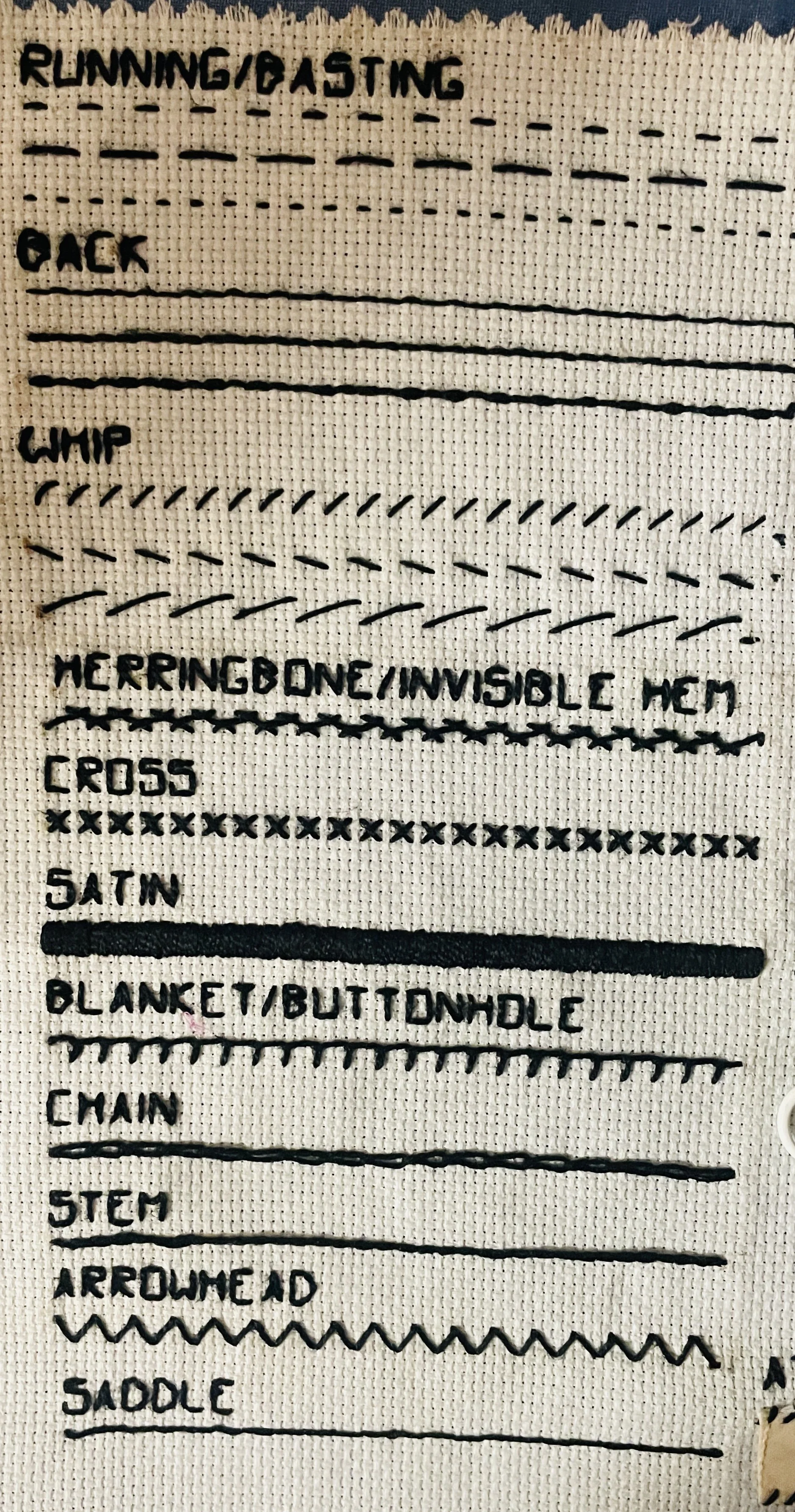
Examples of frequently used stitches in Wardrobe and some common functions.
The types of sewing Wardrobe is usually responsible for are repair, quickrigging, and labelling, rather than garment construction.
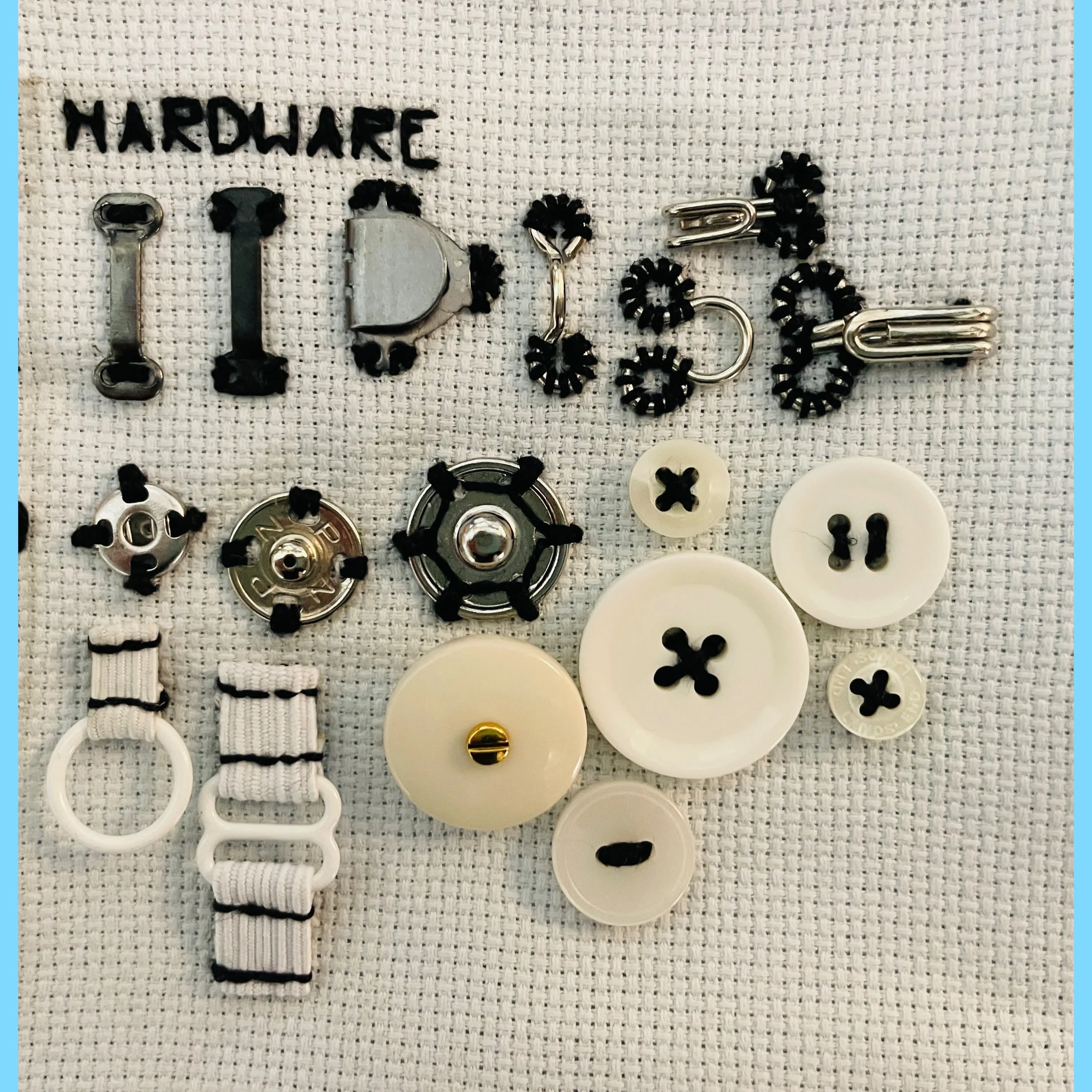
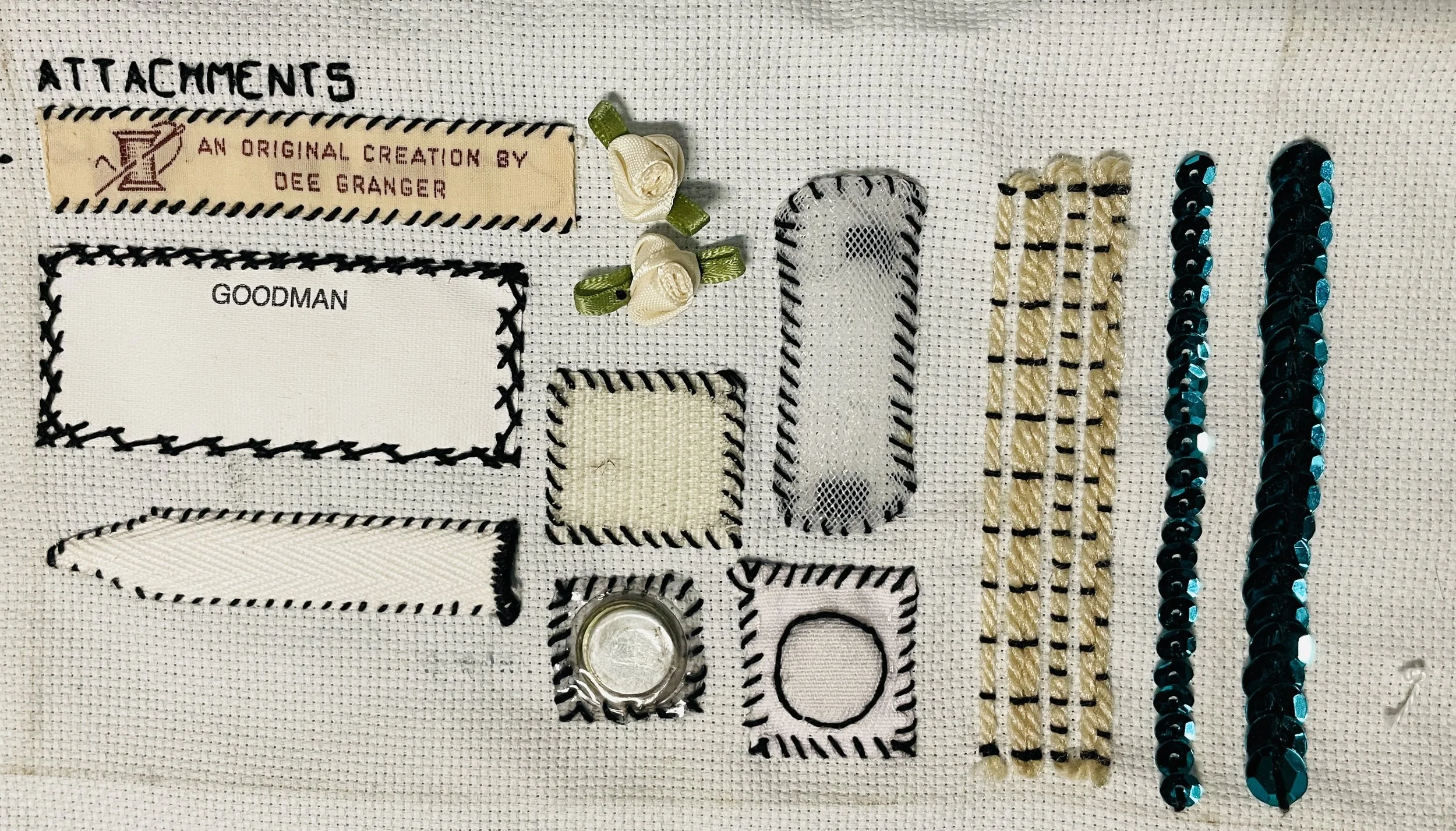
Included are examples with velcro, snaps, magnets, buttons, collar stays, twill tape, crin/horsehair, couching, sequins, hooks and bars, and hooks and eyes.
A more thorough explanation of all these stitches can be found in the RSN Stitchbank.
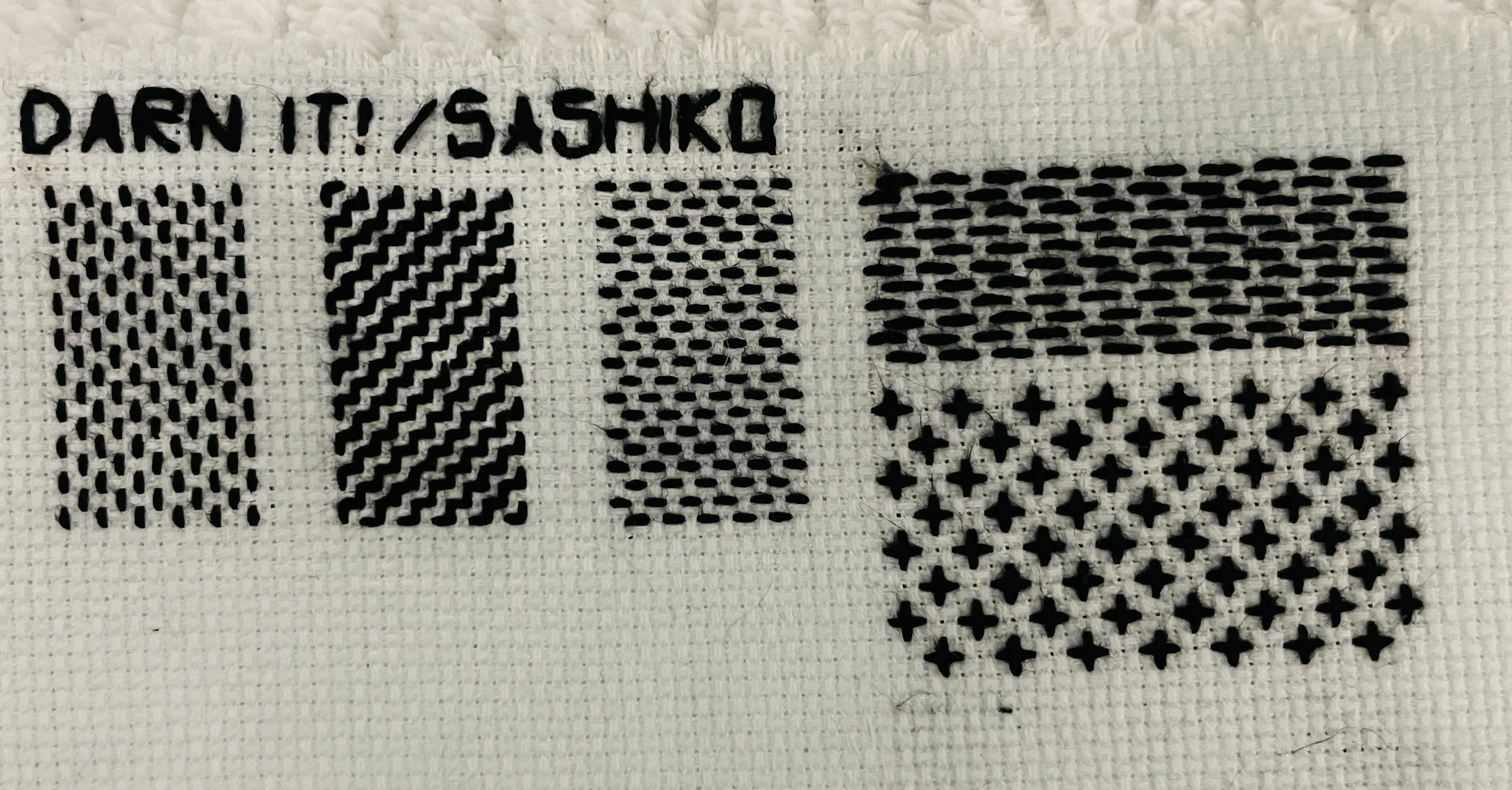
Repair: Sashiko/darning is a great way to reinforce material with a simple field of running stitches.
Labels: Labeling is usually done with a whip or herringbone stitch. Labeling by handsewing means you can keep labels largely invisible from the outside.
Snaps: The key thing to remember with snaps is to tie off each segment when done so that the whole remains sound even if one section comes undone.
Crin/horsehair: Used for attaching combs, for hats, and to add stiffness to a gauzy material. The ends must be folded over and wrapped to keep from fraying in a very pokey way.
Magnets: Do yourself a favor and buy pre-sleeved sewable magnets instead of sewing sleeves for yourself. But if you do, for this, you just take a regular magnet, put it between two pieces of thin fabric, sew around the shape of the magnet so it won’t migrate, between the two fabrics, then attach those fabric squares to the garment.
Stitches: Two stitches are shown here not because they are used frequently in Wardrobe, but to demonstrate characteristics of handsewing and teach its nature; cross-stitch and arrowhead.
Cross-stitch: This is the only X stitch you can make that looks the same front and back. Having a sense of what your stitch will look like on the back is a really useful skill to build and will help you understand which stitch to use.
Arrowhead: From the front it looks identical to the sewing machine zig-zag stitch — but from the back, it's just a double-over whip stitch. This is because the machine is working with two threads that meet in the middle, and hand-sewing is done almost entirely with one. Knowing the difference between hand and machine sewing and when to use them is critical.
Paperwork Templates and documents
Templates masterdoc: https://bit.ly/wardrobetemplates
Drycleaning checkouts: https://bit.ly/drycleaningcheckouts
Initial cast survey: https://bit.ly/initialcastsurvey
damage report template: https://bit.ly/costumedamagereport
damage report template (youth): https://bit.ly/youthdamagereport
Master spreadsheet:
Other resources and tools
Paperwork
Purchasing and Supplies
Wawak Sewing Supply
Cleaner’s Supply drycleaning, laundromat, and tailoring supplies
Blood
WeLoveColors high-quality tights with big color range
American Duchess historical shoe styles
Sewing
We All Sew (Bernina) sewing guides
The Thread Fabrics Store sewing essentials guides
Thread; Interfacing; Overlocker; Elastic; and many more
Sewing machine
Job Boards and Community Resources (Chicago)
Chicago Costume Community: Job board and community space for costumes, wigs, makeup, and hair professionals in the Chicago area
Activism and Community Care
Sizing/Fitting
Shoe sizing conversion (UK/US/Men’s/Women’s)
Other
Museum Textile Services textile conservation
CAFTCAD Presents: The Life of a Costume: A digital exhibition that provides a wonderful introduction to the process of costuming for the screen with many examples of work and explanations of process
Bridging the Gap: A Look Into African American Hair and Makeup for Theatre
Historical Costuming
The Dreamstress’ Great Historical Fashion and Textile Encyclopedia
Corsets and Undergarments
VintageDancer Victorian-1980
Historical hair
Wardrobe Sewing Sampler